 Français
  English
 - Posts: 11646
- Thank you received: 1064
Résolution de problème : merci de consulter la FAQ et le Wiki
Aidez-nous à améliorer le contenu du Wiki et de la FAQ en les consultant. Le Wiki est mis à jour régulièrement et la FAQ permet une résolution rapide des principales embûches rencontrées. N'hésitez pas à nous faire parvenir vos suggestions d'amélioration sur le forum ou à éditer directement le Wiki ou la FAQ .
4.2.00
- sl1200mk2
-
 Topic Author
- Offline
Less
More
5 years 6 months ago #21165
by sl1200mk2
 :Light 4.2.00 is online.
available for every supported systems. (Mac, Pc, Linux, RaspberryPiOS).
thank you to every guys/gals that have tested code during the dev cycle...
please follow this link for change logs :
www.getdlight.com/wiki/index.php/ChangeLog
macOS:
-this release works on new Apple's M1 computer (yeah !!!) // cette release fonctionne sur les nouvelles puces Apple M1
general:
-new UNDO function to revert to previous state is case of mistake // nouvelle fonction UNDO qui permet de revenir à l'état enregistré précédent en cas d'erreur.
-text encoding is now utf-8 (which means that almost all keyboard / user configuration of the world should be properly handled) // l'encodage des textes est dorénavant utf-8 (ce qui signifie que DL doit êtr ecompatible avec tous les claviers / toutes les langues du monde...).
-improvement of .sho recording mechanism // amélioration du mécanisme d'enregistrement des .sho.
Shortcuts:
-third column to register shortcuts // troisième colonne pour enregistrer des raccourcis claviers
Sample:
-you can now select which parameter of Devices will be sampled // vous pouvez dorénavant sélectionner individuellement les paramètres des Devices à sampler
Refresh:
-new behaviour for the Refresh button where first press record channel's state before restoring cue's state. Thus you can switch between modifiedState/cueState/modifiedState/cueState, etc... // nouveau comportement du bouton Refresh où le premier appui sur le bouton enregistre l'état lumineux en cours avant de restituer l'état lumineux de la cue chargé en SCENE. Ce faisant vous pouvez basculer entre étatLumineuxModifié/étatLumineuxInitial/étatLumineuxModifié/étatLumineuxInitial (et au final choisir celui qui vous plait le plus).
Enjoy,
++
Nicolas
nicolas
4.2.00 was created by sl1200mk2
:Light 4.2.00 is online.available for every supported systems. (Mac, Pc, Linux, RaspberryPiOS).
thank you to every guys/gals that have tested code during the dev cycle...
please follow this link for change logs :
www.getdlight.com/wiki/index.php/ChangeLog
-text encoding is now utf-8 (which means that almost all keyboard / user configuration of the world should be properly handled) // l'encodage des textes est dorénavant utf-8 (ce qui signifie que DL doit êtr ecompatible avec tous les claviers / toutes les langues du monde...).
-improvement of .sho recording mechanism // amélioration du mécanisme d'enregistrement des .sho.
Enjoy,
++
Nicolas
nicolas
Please Log in to join the conversation.
- sl1200mk2
-
Topic Author
- Offline
Less
More
- Posts: 11646
- Thank you received: 1064
- celio
- Offline
Less
More
- Posts: 590
- Thank you received: 72
5 years 5 months ago #21206
by celio
Replied by celio on topic 4.2.00
salut Nico, petit test avec la 4.2.0.1 sur Mojave.
le pad à 2 doigts est inversé sur les circuits.
Il est pas inversé dans le dynamic bottom mais passe que de full a 0
sur les subs pas inversé mais va vraiment très vite (de 15 en 15 en moyenne en percent de de 37 en 37 en real)
j'ai essayé en split attached et detached.
j'ai retesté tout marche bien sur la 4.1.15 à ce niveau là.
A suivre
a bientot
Célio
PS : Dans à propos de Dlight il y a toujours écrit 4.2.0.0 alors que je viens de télécharger la 4.2.0.1
je n'ai pas d'autre version 4.2 dans ma machine et n'avait jamais installé qua 4.2.0.0 juste des RC la dernière en date la RC6 mais que j'ai desinstallé avant de mettre la 4.2.0.1
le pad à 2 doigts est inversé sur les circuits.
Il est pas inversé dans le dynamic bottom mais passe que de full a 0
sur les subs pas inversé mais va vraiment très vite (de 15 en 15 en moyenne en percent de de 37 en 37 en real)
j'ai essayé en split attached et detached.
j'ai retesté tout marche bien sur la 4.1.15 à ce niveau là.
A suivre
a bientot
Célio
PS : Dans à propos de Dlight il y a toujours écrit 4.2.0.0 alors que je viens de télécharger la 4.2.0.1
je n'ai pas d'autre version 4.2 dans ma machine et n'avait jamais installé qua 4.2.0.0 juste des RC la dernière en date la RC6 mais que j'ai desinstallé avant de mettre la 4.2.0.1
Please Log in to join the conversation.
- sl1200mk2
-
Topic Author
- Offline
Less
More
- Posts: 11646
- Thank you received: 1064
- dFVarela
-

- Offline
Less
More
- Posts: 102
- Thank you received: 5
5 years 5 months ago - 5 years 5 months ago #21248
by dFVarela
dFVarela
Replied by dFVarela on topic 4.2.00
Hi Nico,
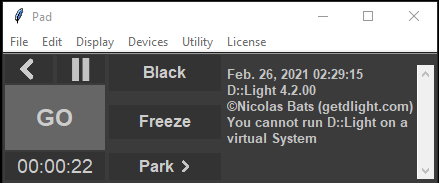
Strange thing is happening on my new Asus ZenBook Flip 14, Win10, when starting gives the error:You can not run DLight on a virtual system!
Another stuff that happens is that, as it does have the new screen pad,DL doesn't recognize the Number keys on the pad, when trying to adjust the shortcuts it gives ???? on the text line but the backspace key does work!
dFVarela
Strange thing is happening on my new Asus ZenBook Flip 14, Win10, when starting gives the error:You can not run DLight on a virtual system!
Another stuff that happens is that, as it does have the new screen pad,DL doesn't recognize the Number keys on the pad, when trying to adjust the shortcuts it gives ???? on the text line but the backspace key does work!
dFVarela
dFVarela
Last edit: 5 years 5 months ago by dFVarela.
Please Log in to join the conversation.
- sl1200mk2
-
Topic Author
- Offline
Less
More
- Posts: 11646
- Thank you received: 1064
5 years 5 months ago #21249
by sl1200mk2
nicolas
Replied by sl1200mk2 on topic 4.2.00
Hi Daniel,
it seems that your windows is configured to run as a virtual machine (called Hyper-V in windows world)
you have to disable that if you want to run DL on it:
docs.microsoft.com/en-us/troubleshoot/wi...ot-work-with-hyper-v
in 4.2 series I've added a third column for shortcuts especially to handle this case
++
it seems that your windows is configured to run as a virtual machine (called Hyper-V in windows world)
you have to disable that if you want to run DL on it:
docs.microsoft.com/en-us/troubleshoot/wi...ot-work-with-hyper-v
did you try with a New sho?Another stuff that happens is that, as it does have the new screen pad,DL doesn't recognize the Number keys on the pad, when trying to adjust the shortcuts it gives ???? on the text line but the backspace key does work!
in 4.2 series I've added a third column for shortcuts especially to handle this case
++
nicolas
Please Log in to join the conversation.
- sl1200mk2
-
Topic Author
- Offline
Less
More
- Posts: 11646
- Thank you received: 1064
- dFVarela
-
- Offline
Less
More
- Posts: 102
- Thank you received: 5
5 years 5 months ago #21251
by dFVarela
dFVarela
Replied by dFVarela on topic 4.2.00
You were right... But cant recall enable Hyper V and already have used this PC with DL and everything, except the numpad, was OK!
Yes tried whit a new show and the numpad doesn't work, every 'key' i press in the line appears '????' the only thing that works is te BackSpace 'key'!
Yes tried whit a new show and the numpad doesn't work, every 'key' i press in the line appears '????' the only thing that works is te BackSpace 'key'!
dFVarela
Please Log in to join the conversation.
- sl1200mk2
-
Topic Author
- Offline
Less
More
- Posts: 11646
- Thank you received: 1064
5 years 5 months ago #21252
by sl1200mk2
nicolas
Replied by sl1200mk2 on topic 4.2.00
so now that Hyper-V is disabled license is ok, right?
what's the matter with your keypad...?
does all others key works?
just for trying, can you set your keyboard as english keyboard?
++
what's the matter with your keypad...?
does all others key works?
just for trying, can you set your keyboard as english keyboard?
++
nicolas
Please Log in to join the conversation.
- dFVarela
-
- Offline
Less
More
- Posts: 102
- Thank you received: 5
5 years 5 months ago #21253
by dFVarela
dFVarela
Replied by dFVarela on topic 4.2.00
Hello again,
And sorry about the double post but making a few experiments and finding erros!
When i try to open a file whit double click i get:
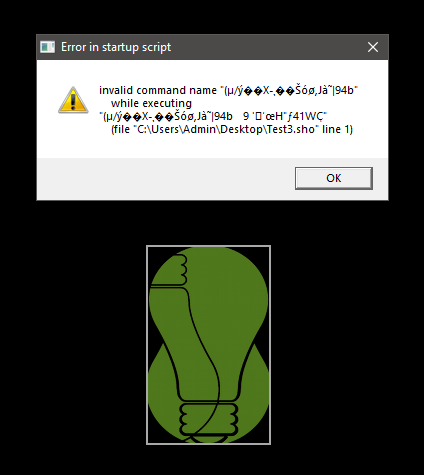
Even if it is a new show recorded in 4.2.01, but don't have any problems when opening from the menu!
About the screen pad i do prefer to use it for more shortcuts:

Got to buy a numeric keyboard, and make some tweaks!
And sorry about the double post but making a few experiments and finding erros!
When i try to open a file whit double click i get:
Even if it is a new show recorded in 4.2.01, but don't have any problems when opening from the menu!
About the screen pad i do prefer to use it for more shortcuts:
Got to buy a numeric keyboard, and make some tweaks!
dFVarela
Please Log in to join the conversation.
- sl1200mk2
-
Topic Author
- Offline
Less
More
- Posts: 11646
- Thank you received: 1064
5 years 5 months ago #21254
by sl1200mk2
nicolas
Replied by sl1200mk2 on topic 4.2.00
about the double-click on sho icon, yes I'm aware of that...
I need to tweak it.
about the screen pad, I thought you were talking of physical keypad that's generally on the right of the keyboard... but you were talking about screenPad?
I didn't knew it even exists... so I've looked what was that and now I understand
it seems cool !! but indeed it should not send KP_Whatever. and right now I have no idea how I could get it to work... ASUS seems to not deliver sdk nor api for this thing...
++
I need to tweak it.
about the screen pad, I thought you were talking of physical keypad that's generally on the right of the keyboard... but you were talking about screenPad?
I didn't knew it even exists... so I've looked what was that and now I understand
it seems cool !! but indeed it should not send KP_Whatever. and right now I have no idea how I could get it to work... ASUS seems to not deliver sdk nor api for this thing...
++
nicolas
Please Log in to join the conversation.
- sl1200mk2
-
Topic Author
- Offline
Less
More
- Posts: 11646
- Thank you received: 1064
5 years 5 months ago #21255
by sl1200mk2
nicolas
Replied by sl1200mk2 on topic 4.2.00
no beta for the weekEnd... so here's some news (for people who lurking here)
j'ai dégagé le deviceCommand et ça fait du bien
Dorénavant, la fenêtre principale, l'éditeur de Chaser et de Sample ont leur propre dynamicBottom.
Le deviceTools ainsi que le paletteListing peuvent être facilement connecté à l'un ou l'autre et la programmation des Devices soit dans le séquentiel dans les Samples ou dans les Chasers s'en trouve grandement simplifiée.
bref ça déchire
Je pense publier une beta courant de la semaine prochaine, vous me direz...
C'est sûr que c'est un changement drastique mais l'essayer c'est l'adopter
++
j'ai dégagé le deviceCommand
et ça fait du bien Dorénavant, la fenêtre principale, l'éditeur de Chaser et de Sample ont leur propre dynamicBottom.
Le deviceTools ainsi que le paletteListing peuvent être facilement connecté à l'un ou l'autre et la programmation des Devices soit dans le séquentiel dans les Samples ou dans les Chasers s'en trouve grandement simplifiée.
bref ça déchire
Je pense publier une beta courant de la semaine prochaine, vous me direz...
C'est sûr que c'est un changement drastique mais l'essayer c'est l'adopter
++
nicolas
The following user(s) said Thank You: Poypoy
Please Log in to join the conversation.
- leoclarys
- Offline
Less
More
- Posts: 346
- Thank you received: 10
5 years 5 months ago #21256
by leoclarys
Replied by leoclarys on topic 4.2.00
Salut Nico,
2 détails:
-dans le patch, il me semble qu'en utilisant la flèche du bas lors de l'encodage du texte des channels, on pouvait directement taper le texte. Pour le moment, on est obligé de double cliquer sur la case.
-ça serait bien que tu précises un peu la syntaxe à utiliser pour encoder un chargement de courbe dans les slinks, ou mettre des exemples. J'ai essayé d'écrire un chargement de courbe pour tous mes channels et finalement j'ai utilisé le "rec slink" dans le patch (ce qui marche très bien aussi)
2 détails:
-dans le patch, il me semble qu'en utilisant la flèche du bas lors de l'encodage du texte des channels, on pouvait directement taper le texte. Pour le moment, on est obligé de double cliquer sur la case.
-ça serait bien que tu précises un peu la syntaxe à utiliser pour encoder un chargement de courbe dans les slinks, ou mettre des exemples. J'ai essayé d'écrire un chargement de courbe pour tous mes channels et finalement j'ai utilisé le "rec slink" dans le patch (ce qui marche très bien aussi)
Please Log in to join the conversation.
- leoclarys
- Offline
Less
More
- Posts: 346
- Thank you received: 10
5 years 5 months ago #21257
by leoclarys
Replied by leoclarys on topic 4.2.00
Re!
A priori bug au niveau du tlink editor: plus moyen de déployer les paramètres pour assigner un tlink à un paramètre de device. (j'en aurais besoin d'ici mardi...)
Bonne fin de weekend!
Léo
A priori bug au niveau du tlink editor: plus moyen de déployer les paramètres pour assigner un tlink à un paramètre de device. (j'en aurais besoin d'ici mardi...)
Bonne fin de weekend!
Léo
Please Log in to join the conversation.
- leoclarys
- Offline
Less
More
- Posts: 346
- Thank you received: 10
5 years 5 months ago #21258
by leoclarys
Replied by leoclarys on topic 4.2.00
Et encore 2 trucs:
-le scroll avec trackpad ou souris ne fonctionne plus ni dans le DC ni le dynamic bottom, sur les paramètres des devices
-dans l'éditeur de sub, le texte du sub ne s'affiche plus, uniquement le numéro de sub
-le scroll avec trackpad ou souris ne fonctionne plus ni dans le DC ni le dynamic bottom, sur les paramètres des devices
-dans l'éditeur de sub, le texte du sub ne s'affiche plus, uniquement le numéro de sub
Please Log in to join the conversation.
Time to create page: 0.186 seconds